Set up your personal uncensored NOSTR relay
If you are familiar with Nostr, you can jump directly to how to set up your own relay. First, I should start talking about what is Nostr. “Nostr is a protocol, designed for simplicity, that aims to create a censorship-resistant global social network”. Nostr stands for Notes and Other Stuff Transmitted by Relays. So, making it simple, Nostr is a protocol, where Nostr accounts (keys), can to send messages (notes), transmitted by relays. So the keys are the WHO, the notes are the WHAT, and the Relays are the HOW.
Relays ( How )
Let’s talk later about why is censorship-resistant, and let me explain with my words, what’s a relay. For me a relay is like a Messenger, a “thing” that sends the messages (or notes) to other accounts (keys).
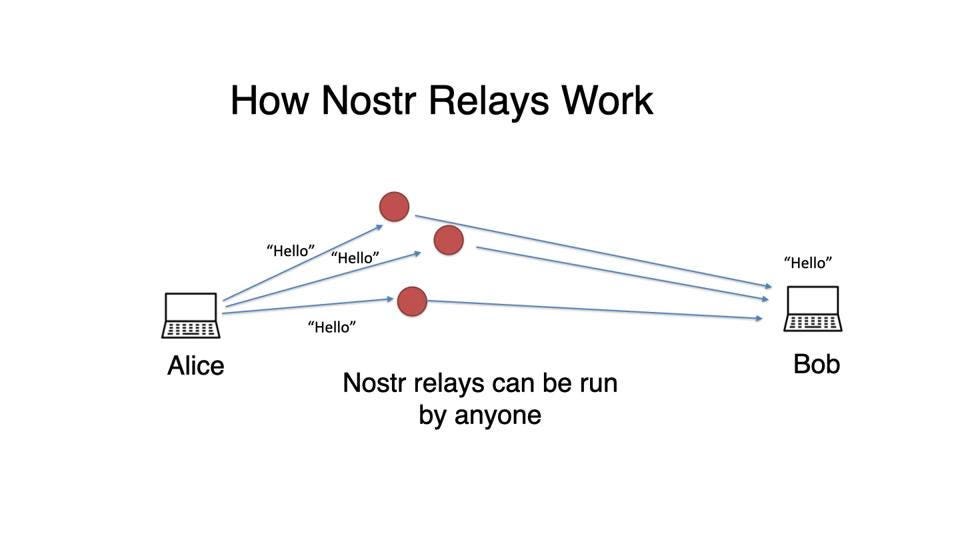
Image from ForbesOk, so now that we know what Nostr is, and what’s a relay we can ask ourselves WHY Nostr ?. And that’s were the censorship-resistant part takes place. You can say that you have Twitter, Reddit, Facebook, Instagram or whatever other app/platform, to send your “notes” (because a note, not only can be text but an image, a video, etc. …). However these apps or platform are centralised. So if post a note in Twitter, that twitter doesn’t like they can delete it. The same happens with the rest of the platforms nowadays.
Let’s put the following image as an example:
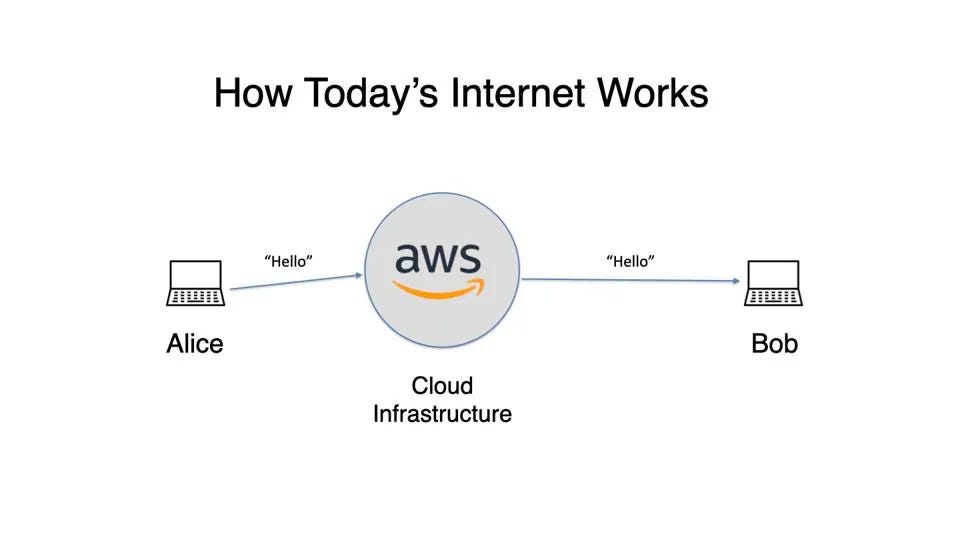
Image from ForbesImagine that instead of AWS, you have Facebook. So every message/note you post, is sent through them. However, with Nostr, there are multiple relays, so when Alice send a note to Bob, there are many relays where Bob can get the message from.
Everybody can set its own relay, so if my relay is connected to the internet, and I want to send a note to Bob, I can use my own relay, and Bob can read it from it. As Nostr protocol is decentralised, my note can be spread in multiple relays, and Bob can read it from any of them.
But also, as the platforms, every relay can set up its own rules, so maybe my notes, are rejected by some relays. However, if you have your own relay, you can send your notes to your relay, and Bob can always read it. That’s why is censorship resistant. It’s your node, and while you are connected to internet, nobody can do anything to block that note.
Keys ( Who ) and clients.
Before I explain the keys, let me talk about the clients. A client is like an app. Is what you need, to send notes. This app can be in the web, or in your desktop, or in your mobile.
So you can go to your browser and write coracle.social and use a web client. Or you can download an app like Gossip, and install it in your computer. Or you can install Damus app in your iphone. Or Amethyst app in your Android.
The good thing about Nostr, is that it works without permissions from any client, so nobody can take out your followers. It doesn’t matter, if one day the app you used blocks you or stop working. The Nostr accounts follow you because how Nostr is built, not because an app has created a follower, or a like o subscriptor, or whatever. The follower is built in Nostr, so the client can’t erase that.
This is the beauty of Nostr, that is a free protocol, that eveybody can use it. Nobody can remove your followers, nobody block your notes. So you can talk (send your notes) freely without any limits. Clients can block your accounts, but you can use other clients. Relays can reject your notes (but other can allow them). So in the end, this is why is censorship-resistant.
Let’s come back now to the keys, or the Nostr accounts. To send notes (and have followers, reply to other notes, follow other accounst you like, … ) you need an account. An account is made by 2 key:
- The public key: it starts by npub….. which is one of its format, the npub format. Or it can be in hex format. You can convert it using this Nostr public key converter.- The private key: it starts by nsec….. never share your private key with anybody or you can loose your Nostr account.
How to Set up your own Relay
First let me say that this is a colaboration between my friend norovid and I. The relay is under norovid’s repository. Second, this relay is a clone of Haven relay, which in reallity is 4 +1 (blossom relay). We copied the sw2 relay logic of whitlist certain Nostr accounts, and applied to our relays. Haven is made with khatru, that is a framework coded go. Khatru is made by fiatjaf, the creator of Nostr.
We use the RejectEvent and RejectFilter functions combined with the sw2 logic, to filter the use of the relays to only ourselves. These two functions are based on the NIP-42 (NIP stands for Nostr Improvement Proposals) and describe the authentication of the clients on the relays.
We use these two functions in the private relay. Here’s the RejectFilter function:
privateRelay.RejectFilter = append(privateRelay.RejectFilter, func(ctx context.Context, filter nostr.Filter) (bool, string) {
  // check if user is allowed
  authenticatedUser := khatru.GetAuthed(ctx)
  if authenticatedUser == "" {
   return true, "auth-required: this query requires you to be authenticated"
  }

  for _, pubkey := range writeWhitelist.Pubkeys {
   if pubkey == authenticatedUser {
    return false, ""
   }
  }
  return true, "restricted: you're not authorized to read"
 })
The function evaluates a condition, if returns true, it reject the authentication, otherwise it will allow it. The first evaluation check if the user is authenticated, the second return false if you are a whitelisted Nostr account, other wise, it will return true
Same thing with RejectEvent in the following code:
// add whitelist to private relay
 privateRelay.RejectEvent = append(privateRelay.RejectEvent, func(ctx context.Context, event *nostr.Event) (reject bool, msg string) {
  if event.PubKey == "" {
   return true, "no pubkey"
  }

  for _, pubkey := range writeWhitelist.Pubkeys {
   if pubkey == event.PubKey {
    return false, ""
   }
  }

  return true, "pubkey not whitelisted"
 })
First evaluation checks if you are an authenticated user, and if you it returns true and reject the Nostr account from the relay. The second one evaluates if you are a whitelist user, and if that is the case, it will return false, so you are not rejected from the relay to send and event to it. And the last line that returns a true, so it reject the user, in case none of the above match.
As a note here, remember that if you want to have your own relay on the internet, you need to have your own domain and an address to point to the relay.