Web Scrapping for Auditing you tracking

Being a Web Analyst is a cool job, you create your tags, see how the data appears in your platform and finally, how you make your stakeholders happy when they see their dashboards with the data that you provide them.
However, life is not perfect and your code is wrong, or the HTML code of the developers is wrong, or… well.. you know… we are just humans.So today I’m going to give you a python script that I made, with the help of the free version of chatGPT, for auditting, if the code of the website, met your tracking requirements.
As I said in my previous article about bot traffic, I work for the igaming industry, and we, forward the users from our website, to our affiliates’ websites. Our code is similar to the bonus.com pages:
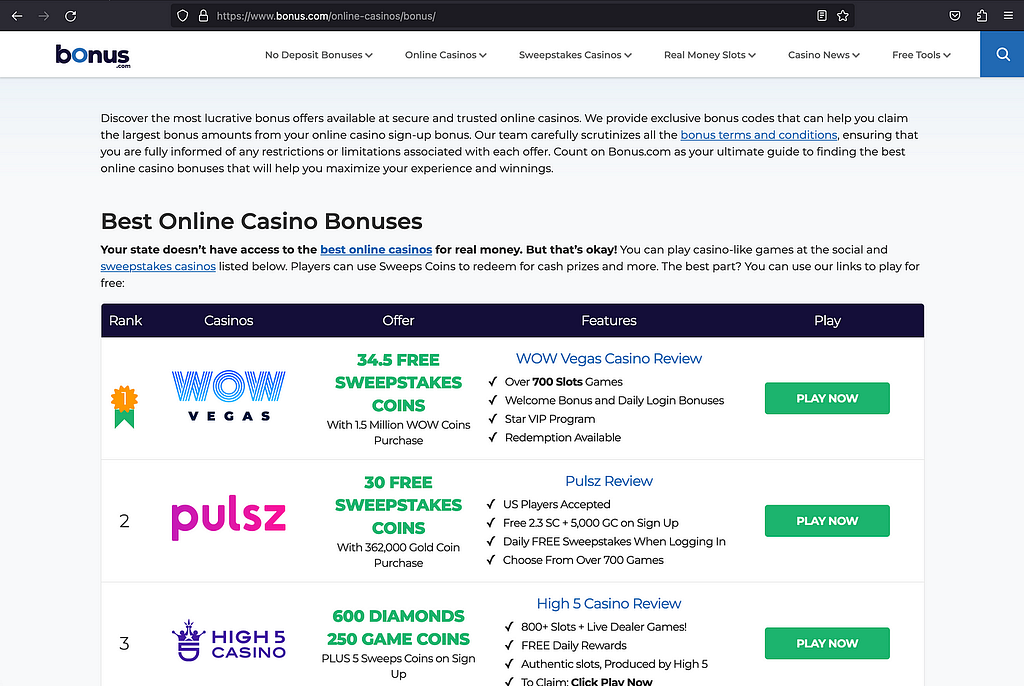
What we need to audit is, wether all of our affiliates’ links, tags, meet the requirements.
The affliate links are tags with the class aff-link.
And these links, are under 3 layers, or <div>s:
1- The list of the affiliates: with the class aff-list. (Best Online Casino Bonuses).
2- The row of each affiliate, affiliate1, … affiliate4 with the class aff-row.
3- The place of the row where the user can click. In order to identify each place, we have a data attribute, data-place, with the value of the place
3.1- The image: data-place=”image”
3.2- The offer: data-place=”offer”
3.3- The PLAY NOW button: data-place=”button”
So the code would be something like this:
<div class="aff-list" data-list="best online casino bonuses">
    <div class="aff-row" data-affiliate="affiliate1">
        <div><p>Rank 1</p></div>
        <div><a href="/affiliate1" class="aff-link"><img src="affiliate1_image.png" alt="" data-place="image"></a></div>
        <div><a href="/affiliate1" class="aff-link"><p data-place="offer">This is the offer of affiliate1</p></a></div>
        <div><p>Feature 1 <br>Feature 2 <br>Feature 3 <br>Feature 4</p></div>
        <div><a href="/affiliate1" class="aff-link"></a><button data-place="button">PLAY NOW</button></a></div>
    </div>
    <div class="aff-row" data-affiliate="affiliate2">
        <div><p>Rank 2</p></div>
        <div><a href="/affiliate2" class="aff-link"><img src="affiliate2_image.png" alt="" data-place="image"></a></div>
        <div><a href="/affiliate2" class="aff-link"><p data-place="offer">This is the offer of affiliate2</p></a></div>
        <div><p>Feature 1 <br>Feature 2 <br>Feature 3 <br>Feature 4</p></div>
        <div><a href="/affiliate2" class="aff-link"></a><button data-place="button">PLAY NOW</button></a></div>
    </div>
    <div class="aff-row" data-affiliate="affiliate3">
        <div><p>Rank 1</p></div>
        <div><a href="/affiliate3" class="aff-link"><img src="affiliate3_image.png" alt="" data-place="image"></a></div>
        <div><a href="/affiliate3" class="aff-link"><p data-place="offer">This is the offer of affiliate3</p></a></div>
        <div><p>Feature 1 <br>Feature 2 <br>Feature 3 <br>Feature 4</p></div>
        <div><a href="/affiliate3" class="aff-link"></a><button data-place="button">PLAY NOW</button></a></div>
    </div>
    <div class="aff-row" data-affiliate="affiliate4">
        <div><p>Rank 1</p></div>
        <div><a href="/affiliate4" class="aff-link"><img src="affiliate4_image.png" alt="" data-place="image"></a></div>
        <div><a href="/affiliate4" class="aff-link"><p data-place="offer">This is the offer of affiliate4</p></a></div>
        <div><p>Feature 1 <br>Feature 2 <br>Feature 3 <br>Feature 4</p></div>
        <div><a href="/affiliate4" class="aff-link"></a><button data-place="button">PLAY NOW</button></a></div>
    </div>
</div>
For auditing this page, we need to check the following requirements:
1- Are there any affiliate links?. If affirmative follow the next steps.
2- The parent of these links, must have a parent with the class aff-row
3- The parent of the parent, must have the class aff-list
For auditing this page, we need to check if the user is under a mobile device or a desktop device, using windows, mac, iOS, Android, …. so in essence, we need to scrap the same page with different user agents. The example python code, use only 1 user agent, but in my previous post, you can check how to fake the user agent and randomly change it.
You will need to install some libraries like Beautifulsoup, requests and pandas.
import requests
from bs4 import BeautifulSoup
import pandas as pd

# Define a list of page URLs
page_urls = [
    'http://www.mywebsite.com/page1',
    'http://www.mywebsite.com/page2',
    'http://www.mywebsite.com/otherpage',
    'http://www.mywebsite.com/anotherpage'
]

# Define a mobile user-agent
headers = {'User-Agent': 'Mozilla/5.0 (iPhone; CPU iPhone OS 14_0 like Mac OS X) AppleWebKit/605.1.15 (KHTML, like Gecko) Version/14.0 Mobile/15E148 Safari/604.1'}

# Create an empty DataFrame
df = pd.DataFrame(columns=['URL', 'Link'])

# Iterate through each page URL
for url in page_urls:
    # Make a GET request to the URL with the mobile user-agent
    response = requests.get(url, headers=headers)

    # Check if the request was successful (status code 200)
    if response.status_code == 200:
        # Parse the HTML content
        html = response.text

        # Parse the HTML with BeautifulSoup
        soup = BeautifulSoup(html, 'html.parser')

        # Find <a> items with class "aff-link" that can have or cannot have parent nodes with class "aff-row"
        aff_links_can_have_aff_row = soup.select('a.aff-link.aff-row, a.aff-link:not(.aff-row)')

        # Filter out <a> items that have parent nodes with class "aff-list"
        aff_links_filtered = [link['href'] for link in aff_links_can_have_aff_row if not link.find_parents(class_='aff-list')]

        # Add the data to the DataFrame
        df = df.append(pd.DataFrame({'URL': [url] * len(aff_links_filtered), 'Link': aff_links_filtered}), ignore_index=True)
    else:
        print(f"Failed to retrieve the page {url}. Status code: {response.status_code}")

# Export the DataFrame to a CSV file, creating or appending as necessary
df.to_csv('output.csv', mode='a', header=not pd.io.common.file_exists('output.csv'), index=False)
You can play around with the code, and export the value of the places, or the list value, where the tracking is not correct…. enjoy and happy analyzing.